
Three weeks after a cutover I sat next to a team lead who had the new system open on one monitor and a spreadsheet on the other. The spreadsheet was the one we had replaced. She was not being difficult about it. She had pushed hard for the project and could list the parts of the new system that beat what she had before. The sheet was open anyway.
The diagnosis everyone reaches for first
When a side spreadsheet outlives a rollout, it gets read as a people problem. The team has not let go, or does not trust the new numbers yet, or somebody needs to be firmer about it. So the fixes that follow are people fixes: another training session, a message from leadership about which system is authoritative, a date after which the old reports stop being accepted. Sometimes access to the old system gets revoked, which is the version that feels decisive.
Those fixes half-work, and the half that fails is predictable. The tracker goes away in the open and comes back in private. Someone keeps a personal copy, exports to Excel every Monday, or keeps a tab open with a saved filter. Nobody can see what it is for any more, which is worse than being able to see it.
The people fix underperforms because most surviving sheets are not arguments about the new system at all. They are shortcuts, and a shortcut only disappears when the main route gets shorter.
Ask what they open it to find out
The question that gets a useful answer is not why someone is still using the spreadsheet. Asked that way, the person hears an accusation and gives whichever answer ends the conversation fastest, usually that they are just double checking for now.
Ask instead what they open it to find out. People answer that one precisely, because it is a question about their work rather than their loyalty. You get answers like: whether this customer has an open credit, which of last week's payments have not matched yet, whether the invoice somebody is asking about was ever approved. Small, specific questions, and each one has a moment attached. Somebody is on the phone, or standing at the desk waiting, or has a reply half typed.
Then time both paths
Once you know the question, time both ways of answering it. Use a stopwatch, sit next to the person, and have them do the lookup in the sheet first and then the same lookup in the new system. Count page loads, not clicks. Do it on real data volume and on the machine the work happens on, because a filter that returns in two seconds against a test database can take fifteen against four years of history.
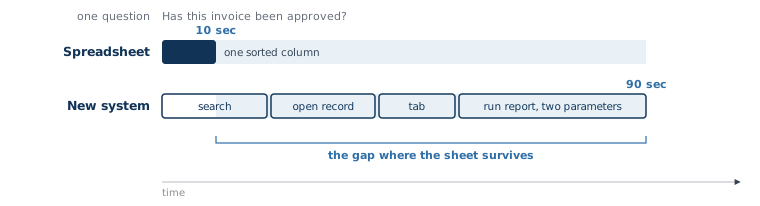
The two times are usually not close. Say ten seconds in the sheet, because the answer is one row in a column somebody sorted months ago, and ninety seconds in the new system, because it is a search, then a record, then a tab, then a report that wants two parameters. Ninety seconds is a reasonable response time for a report and a poor one for a question being asked out loud, right now. The sheet keeps winning that exchange, and it keeps winning it for people who fully believe the new system is correct.
Three reasons a sheet survives, and three different fixes
With the question and the two times in hand, the cause is usually one of three things, and they do not respond to the same treatment.
| What is actually happening | What you hear when you ask | What fixes it |
|---|---|---|
| The answer is slower in the new system | It is just quicker to look here | Shorten the path. A saved view, a search on the field people actually search by, or the number placed on a screen they already have open |
| The field does not exist in the new system | This column is mine, it was never in the old system either | Decide whether the field belongs in the system. Then either add it with a named owner, or accept the sheet as its deliberate home and say so out loud |
| The number in the new system is not believed | Those totals were wrong last month | Find the specific disagreement, reconcile it once in front of people, and show where the number comes from |
Only the third is the trust problem everybody assumes they have, and of the three it is the one I run into least. It is also the only one where more communication helps. The first is a design problem and the second a scope problem, and reassurance moves neither.
The ten second question is a design input
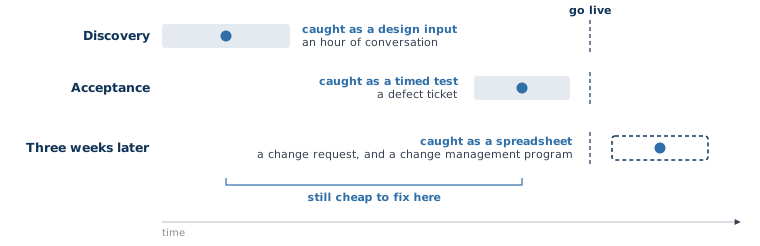
These questions almost never arrive as requirements. They arrive in discovery as throwaway remarks, mid-sentence, on the way to something else. Someone says they usually just check the sheet for that, then carries on telling you about the approval workflow you came to ask about. If nobody writes it down it does not reach the build, and it comes back eleven months later as a spreadsheet.
So collect them on purpose. Keep a running list through discovery, and for each one write the question in the words the person used, who asks it, how often, and how fast the answer has to arrive to be worth anything. That last column is the one that changes the design.
- A ten second question
- Asked while somebody waits, almost always about one record. The answer has to sit on a screen the person already has open, or be one search away. If it needs a report, it will get answered somewhere else.
- A reporting question
- Asked on a schedule, usually across many records. Ninety seconds is fine and so is five minutes. These get specified, because they are the ones people think to ask for.
Designing for the first kind is rarely expensive. It usually means a search box that matches on what people have in hand, an invoice number read off a page or a last name spelled over the phone, a column added to a list view, or a panel on the record showing the three most recent related items without a click. Cheap while the screens are being drawn, awkward once they are built.
Put the lookup in acceptance
A system can pass every functional test and still lose to a spreadsheet. Testing that asks whether a thing can be done will mark the lookup as a pass, because the lookup works. It takes ninety seconds and it works.
Catch it in the test script rather than in a conversation after go live. Write the common lookups into acceptance as timed steps: the named person who asks this question finds the answer in the new system, on real data, inside the time the work allows. That sits beside the rest of what acceptance should prove, and it fails the same useful way. A miss becomes a defect with a number on it while there is still a build team and a budget. The same finding after cutover arrives as an adoption problem, and adoption problems get a meeting rather than a fix.
What the sheet costs while it stays open
A spreadsheet that answers one question quickly does not stay a spreadsheet that answers one question. A column gets added for a flag the system does not have, then a tab for the exceptions, then a second person starts a version of their own because the first one is out on Fridays.
The costs land where a COO feels them. Two sets of numbers get quoted in the same meeting and the meeting turns into an argument about which is right, which is what a field corrected in two places always produces. Ownership of the field is the part that got skipped. Work done in the sheet leaves no record in the system, so history stops at the edge of the file, and the one question an auditor asks about that period is the one it cannot answer. And when the person who keeps the sheet leaves, the file is easy enough to find. What goes with them is the knowledge of which column mattered and which three were abandoned in March.
Start with the sheet
None of this means the spreadsheet has to be gone by Friday. It means the sheet is evidence, and it points at something you can act on. Open it, find the question it answers, time both paths, and fix whichever of the three causes is the real one. That fix is usually smaller than the change management program it replaces, and it holds without monthly reminders.
If you went live and the old spreadsheets are still open, that is the kind of thing we work through in discovery. It is a short, structured engagement that maps how the work really runs, including the questions your team answers in ten seconds today, before anyone writes code. You can start that conversation by clicking on the button below. Start with Discovery